One markdown file, three sites: what broke the first time my crosspost ran
My build log publishes one markdown file to GitHub Pages, dev.to and Hashnode on merge. The cross-posting sat untested for a week, and the first real post broke it four ways: relative URLs, an npm lockfile, a retired Hashnode endpoint, and a green run that hid a failure. Five small PRs fixed it.
Case file
- Incident: Oct 30–31, 2026
- Symptom: the publishing pipeline for this log was built on Oct 24–25 and had never sent a single post. The night the first real post went out, it broke in four separate places.
- Evidence: a dry run that sent
/build-log/images/...paths to dev.to and Hashnode unchanged; a Cross-post run that died atnpm ciwithMissing: @emnapi/core@1.11.3 from lock file;Hashnode FAILED: fetch failedin the log of a run that still finished green. - Cause: four assumptions nobody had tested live. Relative URLs only resolve on my site. The lockfile came from a newer npm than the GitHub runner uses. Hashnode’s old API host now redirects to a paid-API notice. And the script treated “a site rejected this post” as a log line, not a failure.
- Fix: five small PRs between 12:29 and 2:04 AM CT on Oct 31: #17 (absolute URLs), #18 (lockfile), #19 (Hashnode endpoint), #20 (re-run the post) and #21 (fail the run).
- Prevention: tests for the URL rewriting that run before every cross-post, a lockfile made with the runner’s npm, and a run that goes red when any site rejects a post. The next post, the AMD boot loop one, went to all three sites on its first try.
- Lesson: a pipeline that has never run isn’t done. It’s a draft.
The story
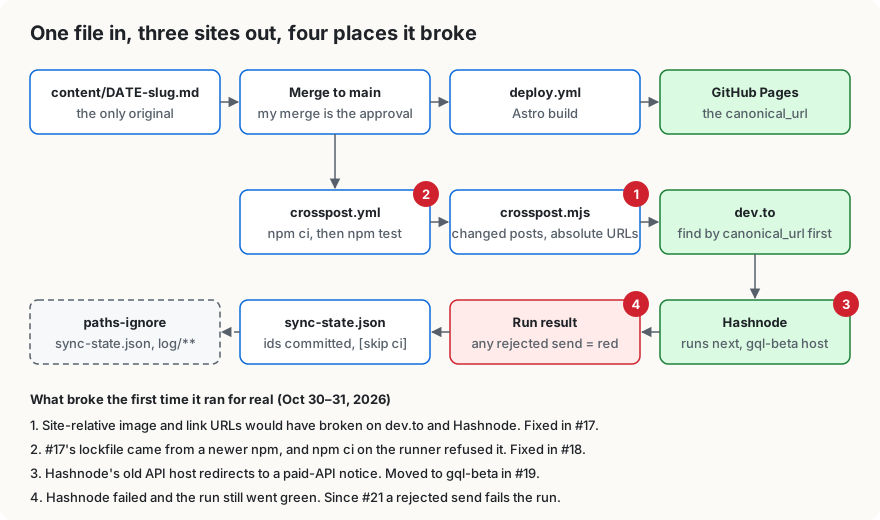
The idea was simple. I write each post once, as a markdown file in a public GitHub repo. When I merge it, a GitHub Action builds the site on GitHub Pages, and a second job sends the same file to dev.to and Hashnode with a canonical link pointing back to the site. No copy-pasting, no “which version is the real one.”
That got built on Oct 24–25. The first pull request merged at 2:27 AM CT on Oct 25, and the cross-post job ran right away. Its entire output was No content entries to cross-post. There weren’t any posts yet. So for about a week I had a pipeline that had “run” exactly once and done nothing. My old draft of this post said it plainly: the auto-publish has never actually run.
There was one detour back then that I’m keeping in the story. Hashnode’s GraphQL API had started requiring a Pro plan, and my first reaction was to drop Hashnode to drafts only. Then I looked at the price, asked “Unless mistaken, $5/mo on Hashnode should work for API work?”, and it did. I upgraded, added the two Hashnode secrets, and the sender went back in. I also asked whether I needed a separate “publisher bot.” The answer was no: publishing is the same steps every time, and fixed steps belong in code. My merge is the approval, and the Action ships it.
Then on the night of Oct 30 I finally had a real post to send: the “how it started” retro. HQ, the Grok Bot I do most of my work with, was getting it ready, and the first problem got caught before anything went live. The retro’s diagrams were linked as /build-log/images/how-it-started/.... That works on my site. On dev.to it would point at dev.to. The script was sending the markdown untouched. That became #17, which parses the markdown and rewrites site-relative links and images to full URLs before sending, without touching code blocks. It went through a lot of review rounds (Copilot and Cursor Bugbot both found real edge cases) and merged at 12:29 AM.
The Cross-post run for that merge failed within seconds. Not on dev.to, not on Hashnode, but on npm ci:
npm error `npm ci` can only install packages when your package.json and package-lock.json or npm-shrinkwrap.json are in sync.
npm error Missing: @emnapi/core@1.11.3 from lock file
npm error Missing: @emnapi/runtime@1.11.3 from lock file
Fixing break one had caused break two. #17 added a markdown parser, and the lockfile that came with it was written by a newer npm than the one the runner gets with Node 22. #18 regenerated it with Node 22.23.4 and npm 10.9.9, the same versions CI uses, and merged at 1:13 AM.
At 1:38 AM I merged the retro itself. The run went green. dev.to had the post. Hashnode didn’t. Buried in the log was one line: Hashnode FAILED: fetch failed. Hashnode had retired gql.hashnode.com. It now answers every request with a 301 to a notice about paid API access, and my sender refuses redirects on purpose, so every call failed before it reached the API. Hashnode’s own CLI uses gql-beta.hashnode.com, and a read-only test query with my token worked there. #19 was a one-line endpoint change, merged at 1:53 AM.
But merging a script fix doesn’t re-send anything, because the job only sends posts whose files changed in that push. So #20 added one trailing newline to the retro, which doesn’t change how it renders, just to make it count as changed. That merged at 1:55 AM, and this run is the one I was waiting for: dev.to updated the existing article in place (no duplicate), and Hashnode published the post.
That left the part that bugged me most. The 1:38 AM run had been green with a failed site in it. If I hadn’t read the log, I’d never have known. The Hashnode sender returned { failed: true } instead of throwing, and the main script just moved on. #21 counts those results as failures. The other sites still get their turn, but the run ends red and GitHub emails me. Merged at 2:04 AM.
The real test came a couple of hours later. At 4:21 AM I merged the AMD boot loop post, and its run created it on dev.to and Hashnode on the first try, then committed both ids to sync-state.json. Nobody touched anything. That’s the whole point.
These days the roles are simple. GitHub is the source: the posts, the code, and the PRs where the reviewers argue. Linear is the backlog of post ideas and fixes. Notion holds private session transcripts that never get published. X, LinkedIn and Facebook get drafts that I post myself.
Do it yourself
My code is all in the public repo, github.com/mikepred/build-log. This is the shape of it.
1. One file per post, with a canonical URL. Mine live in content/YYYY-MM-DD-slug.md:
---
title: "One markdown file, three sites"
date: 2026-10-31
tags: [github-actions, astro, devto, hashnode]   # 4 max, dev.to's limit
summary: "Used as the meta description, dev.to description and Hashnode subtitle."
canonical_url: "https://<you>.github.io/<repo>/<slug>/"
---
Pick the canonical URL once and never change it. dev.to and Hashnode both use it to find the existing copy.
2. Build the site from the repo. I use Astro, deployed to GitHub Pages by its own workflow (deploy.yml) on every push to main. That one doesn’t know cross-posting exists, so a broken cross-post never blocks the site.
3. Cross-post from a second workflow, and keep it on a short leash. In crosspost.yml, ignore the files that shouldn’t trigger it, run the tests before sending anything, and pass secrets only to the step that needs them:
on:
  push:
    branches: [main]
    paths-ignore:
      - sync-state.json   # the state commit shouldn't start another run
      - 'log/**'          # running-log notes are site-only

# ...
      - name: Install dependencies
        run: npm ci
      - name: Run tests
        run: npm test
      - name: Publish changed entries
        env:
          DEVTO_API_KEY: ${{ secrets.DEVTO_API_KEY }}
          HASHNODE_TOKEN: ${{ secrets.HASHNODE_TOKEN }}
          HASHNODE_PUBLICATION_ID: ${{ secrets.HASHNODE_PUBLICATION_ID }}
          BEFORE_SHA: ${{ github.event.before }}
        run: node scripts/crosspost.mjs
The script diffs BEFORE_SHA against the pushed commit and only sends posts in content/ that changed. Each platform is one small file in scripts/senders/ with the same four exports (id, disabledReason, plan, publish), so adding or dropping a site is one file.
4. Make every send safe to repeat. Before creating anything, look for the existing copy. My dev.to sender checks the stored id, then looks for an article with the same canonical_url, and only creates one if neither exists. Hashnode does the same with originalArticleURL. The ids go into sync-state.json, keyed by slug, and the workflow commits that file back with [skip ci] in the message. That’s why re-sending the retro updated dev.to instead of duplicating it.
5. Rewrite site-relative URLs before sending. On your site, /build-log/images/x.svg is fine. Anywhere else it’s broken. Rewrite links and images under your base path to absolute URLs in the copy you send, and leave code blocks alone:
before: 
after: Test it. Mine has tests for nested HTML, inline code inside link text, lookalike paths like /build-logs, and code blocks inside lists, and the workflow runs them before every cross-post.
6. Make the lockfile with the runner’s npm. npm ci refuses a lockfile that’s out of sync with what its npm expects. If your workflow uses node-version: 22, regenerate the lockfile with Node 22’s npm (10.x), not whatever newer npm you have locally:
node -v   # v22.x, same major as the workflow
npm -v    # 10.x
npm install --package-lock-only
npm ci && npm test
7. Fail the run when any site rejects a post. Keep going so the other sites still get their copy, but don’t let the run finish green:
if (remote?.failed) {
  // The sender already logged the details. Count it so the run ends red.
  failures.push(`${sender.id} ${entry.file}: ${remote.message ?? 'failed'}`);
  continue;
}
// ...after every post and every sender:
if (failures.length > 0) {
  throw new ScriptError(`${failures.length} cross-post send failed.`);
}
A missing secret is different. That sender is skipped with a warning, so a copy of the repo without those accounts still gets a clean run. If every sender is skipped, the script warns and exits 0.
8. Dry-run before the first real merge. My script has a mode that builds every request and prints it, with no network and no state written:
node scripts/crosspost.mjs --dry-run content/2026-10-31-one-markdown-file-three-sites.mdThat’s how #17 got checked: the retro’s diagram paths came out relative before the fix and absolute after it. A dry run can’t catch the other three, though: npm on the runner, a retired endpoint and a hidden failure only show up on a real run. So plan to watch the first one.
Caveats
- Hashnode’s API needs a Pro plan, and its old host
gql.hashnode.comnow redirects. Mine usesgql-beta.hashnode.com, the host its official CLI uses. - Editing a copy on dev.to or Hashnode doesn’t stick. The next time that post’s file changes, the repo version overwrites it.
- dev.to strips tags down to letters and numbers, so
github-actionsshows up there asgithubactions.